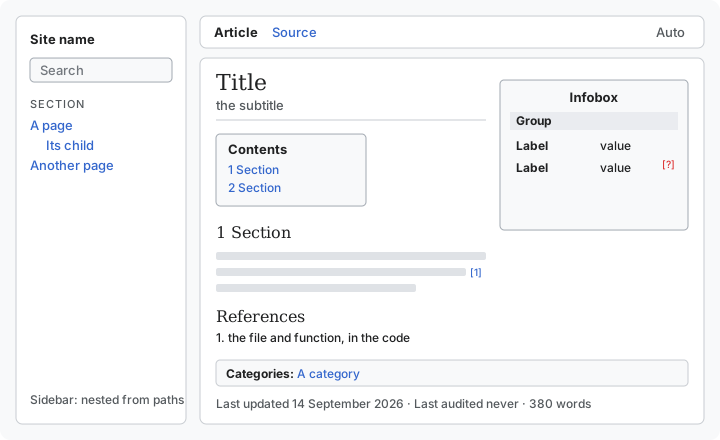
A page is one markdown file in docs/wiki/pages, with a few lines of TOML front matter at the
top.[1] Every field the front matter can hold is listed on Front matter. Where the file sits is both its address and its place in the sidebar: a page in a folder
named after another page nests beneath that page without being listed anywhere.[2] What the build
makes of a page is described on Site.
Intent
Every page must have a title and say what it is for, in an intent, or the build stops.[3] An
intent may run to 120 words by default, and a longer one also stops the build.[3] A page that
still gives its subtitle as kicker stops the build too, with a message to rename it.[4] Every
approved page's intent is collected onto the goals page in sidebar order, so the purpose of the whole
project can be read in one sitting.[5]
A page about the wiki itself, such as the front page, says goals = false to stay off the goals
page.[6] The same setting excuses a page from citing anything, whatever it describes.[6]
Approval
A page is a draft until its front matter says status = "approved".[7] A draft sits in the sidebar like any other
page, under a banner saying that the owner has not approved it.[8] Search, the categories and the goals
page offer only approved pages.[9] What a part of the system is for is the owner's decision, and
an agent that drafts a page has not made it.[7]
A page that no reader can reach from the sidebar stops the build, whether it is a draft or not.[10]
Parts
The parts of a page: the sidebar with search, the tabs, the title and its subtitle, the infobox, the
numbered contents, the body, the references, the categories and the date.
The infobox holds a handful of facts a reader would check, in groups of rows.[11] Every row cites
a footnote the page's text cites for the same fact, or is marked as having no source.[12] A row can
also record the requirement it satisfies, which is kept for whoever checks the page but never
shown.[11] A row's value can link to an address outside the wiki, and opens the way any outside
link does.[11]
A page gets a numbered contents box once it has more than two second- or third-level headings, and
the References heading at its foot counts as one.[13] A page's categories
appear at its foot, and each links to a generated page listing everything in that category.[14]
The Source tab shows the page's own markdown with a button that copies it, which is why no page may be
named "source".[15]
A flowchart or other diagram is written as a mermaid code block and drawn on the page, as described
on Diagrams.
Last updated 14 September 2026475 wordsabout 2 minutes to read15 sources cited0 claims with no source